.png?width=300&height=65&name=GG%20Logo%20Main%20Navy%20(1).png)
The People panel provides an active feed of users who have either enabled live location tracking or checked-in within the past 30 minutes. This feature allows admin users to easily monitor activity and view each individual’s last known location.
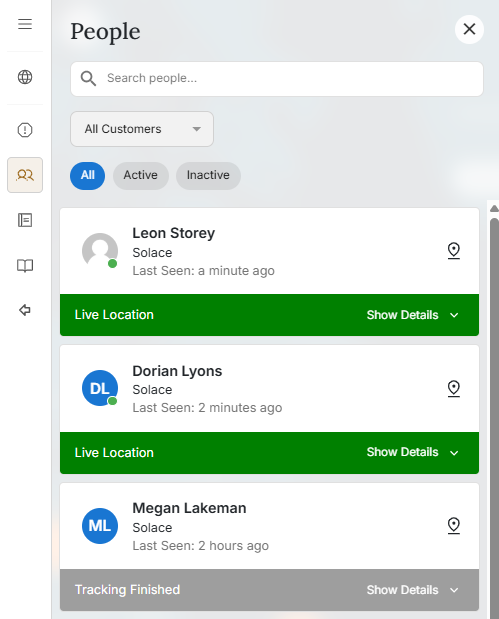
NOTE: If a user becomes inactive for more than 30 minutes, their last known location remains visible for up to 2 days within the “Inactive” tab. This ensures administrators can still reference recent movement history, even after live tracking has ended.
You can quickly find a specific person by searching their First Name or Last Name. By clicking “Show Details” reveals a mini map displaying the user’s last known location.
Above the mini map, you’ll find convenient options to contact the individual directly via:
- Phone Call
- SMS Message
- WhatsApp Message
- App Notification
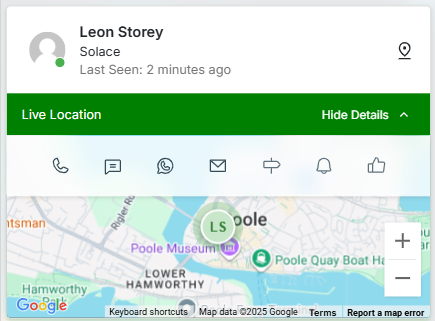
The user can be pinpointed on the map by clicking the "View on map" button.
Differences between the People panel and People within the Activity Feed
The People panel is a tracking tool that allows administrators to view a traveler’s last known location and determine their position with greater accuracy - especially useful for tracking travelers who have Live Location enabled in the app.
The Activity Feed (People tab) provides a chronological timeline of user location events, allowing administrators to retrace a traveler’s journey and monitor past check-ins or SOS activity.
Pro Tips:
Hovering over "Last Seen:" in the People panel allows you to see the exact Date/Time of the last known location for an individual.