.png?width=300&height=65&name=GG%20Logo%20Main%20Navy%20(1).png)
The Home Country field on a user profile identifies the traveler’s primary country of residence. This setting plays an important role in how automated notifications and alerts are triggered, particularly at the end of a journey.
By accurately setting a traveler’s home country, the platform can reduce unnecessary or duplicate notifications once travel has been completed.
Why Home Country Matters
Automated notifications are often triggered when a traveler:
- Completes the final segment of a journey
-
Finishes a single-segment or domestic trip
If a traveler’s home country is missing or incorrect, the platform may incorrectly interpret the end of a trip and send additional notifications that are not relevant to the traveler. This can result in:
-
Excessive or confusing notifications
-
Reduced engagement with important alerts
-
Notification fatigue for frequent travelers
Setting the correct home country helps ensure that notifications are sent only when appropriate.
The Home Country field can be updated in several ways:
Administrator Updates
Platform administrators can set or update a user’s home country directly within the user profile.
User Self-Service
Travelers can update their own home country through:
-
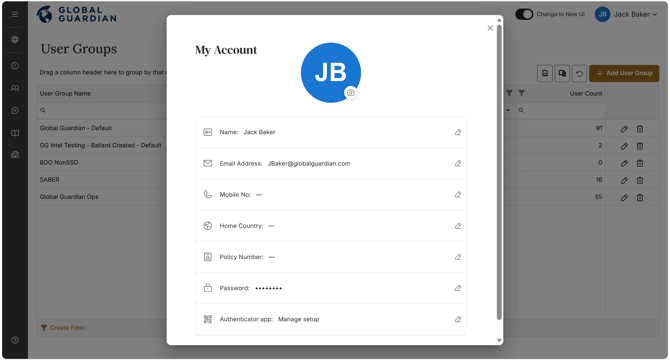
The web platform via personal profile settings in the top right-corner.
HR Feed Integrations
For customers with HR feed integrations, the home country field can be automatically populated and maintained if this information is available in the HR system, helping ensure ongoing accuracy without manual updates.
Best Practices
To ensure optimal notification behavior:
-
Set a home country for all travelers wherever possible.
-
Encourage users to review their profile details during onboarding.
-
Use HR feed automation if available to keep data current.
-
Review home country settings if travelers report excessive notifications after trips
The Home Country field is a key profile setting that helps control automated notifications at the end of a traveler’s journey. By keeping this information accurate whether through administrator management, user self-service, or HR integrations, customers can reduce unnecessary alerts and improve the overall traveler experience.
If you need assistance managing home country settings, please contact your platform administrator or the Global Guardian support team at +1 (703) 566-9463 or info@globalguardian.com.