.png?width=300&height=65&name=GG%20Logo%20Main%20Navy%20(1).png)
How to raise an SOS
In the event of an emergency, you can initiate an SOS alert by tapping the red SOS button on the app home screen. This will start a 15-second countdown. Things to note:
- If triggered accidentally, you can tap Cancel during the countdown to abort the SOS and return to the home screen.
- To send the SOS immediately, tap SOS NOW.
- To stop an active SOS, tap the red banner at the top of the map screen and select Stop SOS Tracking. This will cancel both the SOS and location tracking.
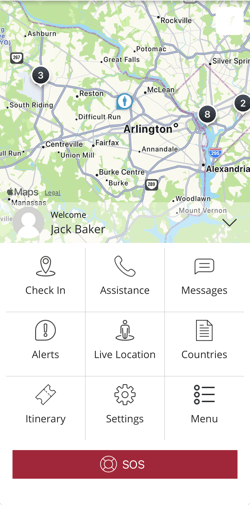
Tip: SOS alerts can be raised on iOS through widgets or your Apple Watch.
Following an SOS Activation
The SOS alerts the Global Guardian 24/7 Response Team that the user requires assistance and automatically pinpoints the user's location on the map as well as initiate the SOS tracking. The Global Guardian team will immediately attempt to call the user to ascertain their safety, before notifying their organization's designated Points of Contact (POCs).
If the SOS Was Accidental?
If the SOS was triggered by mistake, the Global Guardian team will confirm this with the user during the call and instruct them to cancel the tracking session. Customer POCs will be notified via email that the SOS was accidental.
What if Global Guardian Cannot Get in Touch with the User?
Global Guardian will attempt two more phone calls to the user before attempting to contact via email and SMS. If there is still no response, Global Guardian will contact customer POCs to inform them of the situation and that the user cannot be reached.
Together with your POCs, Global Guardian will decide the most appropriate next steps, including direct outreach from their side while continuing attempts to reach the user.
What Happens When There Is No Connectivity?
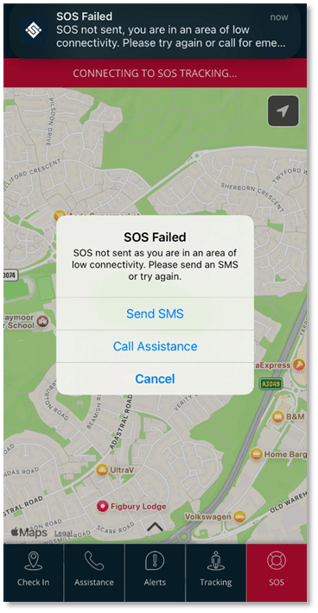
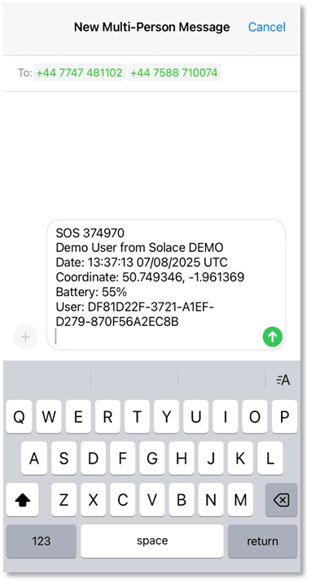
If a user presses the SOS button while experiencing low or no connectivity, they will be given the option to send an SMS. This message will be pre-filled with the user's name and location coordinates and sent to the Global Guardian Response Team. Upon receiving the message, Global Guardian will be alerted to the situation and will attempt to reach the user directly or contact their designated points of contact.
What Happens During a Verified or Genuine SOS?
If the Operations Response team calls a user who has activated their SOS, the team will immediately determine the situation and offer any advice to immediately assist the user. Examples include:
- If the user is injured — the team will offer basic lifesaving advice if required and reassure the user. We will ensure they have called local emergency services.
- If the user is concerned they are being followed — the team will remain on the phone and direct them using the tracking function to the nearest police station or a location where they can receive further assistance.
What Happens After an SOS?
Global Guardian works with customers to help support them in a crisis. Drawing on a global network, on-the-ground expertise, and real-time intelligence, Global Guardian coordinates the most appropriate support—whether that’s deploying local security teams, arranging safe transportation, or liaising with emergency services. Throughout the process, clear communication is maintained with the client’s designated contacts, ensuring they have a full picture of the situation. This swift, coordinated response reflects Global Guardian's commitment to putting people first, enabling travelers to operate with confidence wherever they are.