.png?width=300&height=65&name=GG%20Logo%20Main%20Navy%20(1).png)
An automated email and/or SMS notification can be sent immediately from the platform when a user hits the SOS button in the mobile app.
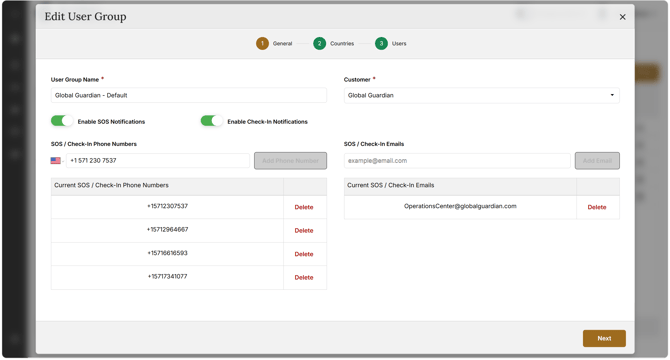
In order to set this, administrators can add an email address and phone number (including international dialing code) to a user group. This means when any user in that user group hits the SOS button in the app, the automated notifications will be sent out.
- In the Admin Panel, click on "User Groups."
- Select the relevant user group by clicking the edit icon
 .
. - Enter the email address or phone number for each contact (phone numbers must include the international dialing code and no other symbols, e.g., +17035669463). Click "+" to add the respective contact details one at a time.
- Click "Next" until you can click "Save."