.png?width=300&height=65&name=GG%20Logo%20Main%20Navy%20(1).png)
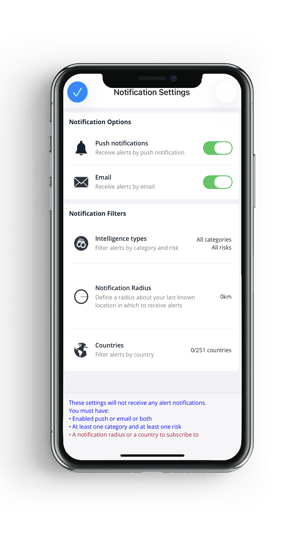
When setting up notifications in the mobile app, the following logic applies. It is helpful to understand these settings to ensure you receive alerts according to your preferences.
To access your notification settings, tap "Menu" from the HALO app home screen, then tap "Notification Settings."
It is important to note a user may be receiving alert notifications due to their customer notification settings. These can be set to be optional, allowing recipients to unsubscribe, or mandatory, in which a user cannot unsubscribe.
Each alert email will indicate why you are receiving it.
An app user will receive a notification if:
The alert meets the criteria set for the selected intelligence category type AND risk level
AND EITHER
The alert is within the radius set for your last known location (for users with app tracking available)
OR
The alert meets the selected country criteria
Below is an image of the notification settings area in the mobile app