.png?width=300&height=65&name=GG%20Logo%20Main%20Navy%20(1).png)
Its primary purpose is to help answer three key questions quickly:
- Where is this user?
- What is currently impacting them?
- What information do we have about them in the platform?
By consolidating this information into one interface, administrators can rapidly assess a user's status and navigate to more detailed information when required.
Finding Users
The People Panel includes all users within your platform and is ordered by most recent tracking activity by default, making it easy to identify users with recent updates.
You can also:
- Apply filters to narrow the list of users.
- Reorder the panel based on your preferred criteria.
User Summary Card
In the Navigation toolbar, click "People."
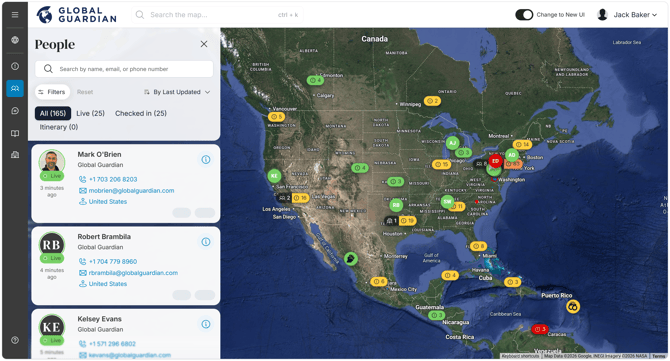
Each user displays an initial summary card containing the most important information at a glance.
The summary card includes:
- The user's profile information.
- Their most recent tracking activity.
- How long ago that activity occurred.
- The type of tracking activity, such as:
- Live location update
- App check-in
- SOS event
- Travel itinerary activity
- Contact details for the user.
The card also displays status indicators showing whether the user has:
- Any Intel Alerts from the last seven days.
- Any active or upcoming travel itineraries.
These indicators allow administrators to quickly identify users who may require attention.
Viewing the Full User Profile
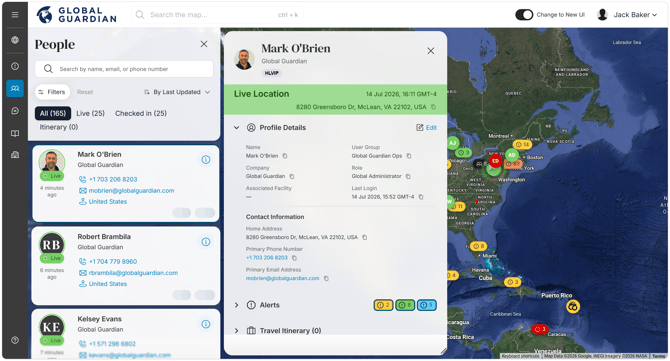
Click the "i" (Information) icon to open the user's complete profile.
The detailed profile includes clickable links for editing user information where permissions allow.
Information is organized into collapsible accordions, enabling you to focus only on the sections relevant to your investigation.
Alerts
The Alerts accordion displays all associated Intel Alerts from the last seven days. Expand the section to review individual alerts, and select an alert to view its full details.
Travel Itinerary
The Travel Itinerary accordion contains the user's current and future travel plans. Expand this section and select an itinerary to access more detailed travel information.
Devices
The Devices accordion lists the applications or devices through which the user has logged into the platform, providing visibility into their registered app usage.
Location History
The Location History accordion displays the user's tracking history for the previous 48 hours. Expand the section to review recorded tracking events. Selecting "More History" opens a separate pop-up containing a map view of the user's full 48-hour tracking history for enhanced situational awareness.
Exploring Associated Information
Each accordion can be expanded to reveal additional context and linked records.
For example, administrators can:
- Open an individual alert to review its details.
- Drill into a travel itinerary for more comprehensive trip information.
- Review location records over the last 48 hours on an interactive map.
This layered approach keeps the interface concise while allowing rapid access to deeper information when needed.
Key Benefits
The People Panel gives administrators a comprehensive view of each user without needing to navigate between multiple areas of the platform.
With access to profile details, tracking activity, alerts, itineraries, devices, and location history from one place, administrators can quickly understand a user's current situation and make informed decisions when responding to operational or safety events.