.png?width=300&height=65&name=GG%20Logo%20Main%20Navy%20(1).png)
Key Features
Contacting the Operations Team
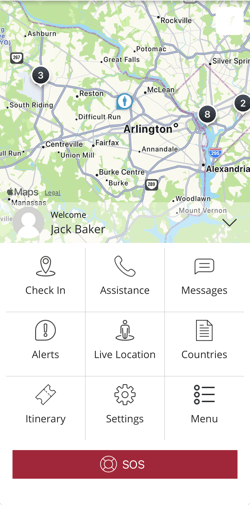
You can start a conversation with the operations team at any time by tapping the Message button within the mobile app. This allows you to ask questions, report issues, or request assistance.
 Receiving Messages from the Operations Team
The operations team can also initiate conversations with you. If your location is affected by an ongoing event or requires attention, they may contact you directly through the chat feature to provide updates or instructions.
Notifications and Alerts
To ensure you don't miss any messages:
- Make sure notifications are enabled for the app in your device settings.
- When a new message or response is received:
- You will see a notification on your lock screen
- A red indicator badge will appear on the messaging tile in the app's main menu
Important Notes
- If notifications are disabled, you may not be alerted to new messages in real time.
- You can still access all messages by opening the messaging section within the app.
This messaging feature helps ensure clear, timely communication between you and the operations team, especially during important or time-sensitive situations.