.png?width=300&height=65&name=GG%20Logo%20Main%20Navy%20(1).png)
Administrators can receive notifications when specific itineraries are processed to the platform, whether through manual creation or automatically through the travel management company. Administrators can create as many custom notification rules as needed.
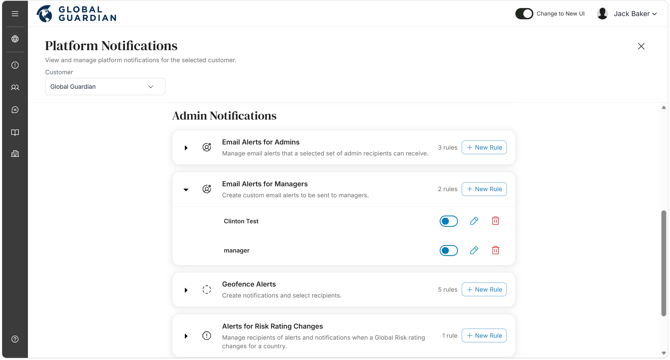
Access by going to the Admin Panel and selecting "Platform Notifications." Under "Admin Notifications" you will find "Email Alerts for Managers." Select "+ New Rule" and a variety of options are available to set as preferences:
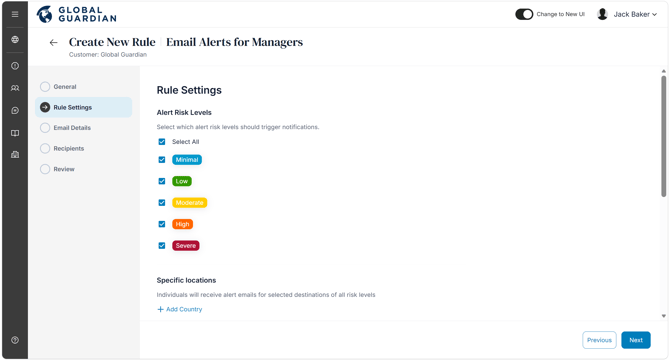
- Alert Risk Levels: Select destinations by risk level for which administrators will be informed of booked travel.
- Specific Locations: Select the countries/cities for which administrators would like to be notified of booked travel.
- Segment Limits: Set the limits for the number of travelers on the same segment, zero indicates no limit.
- Tag Limits: Set limits for each tag below.
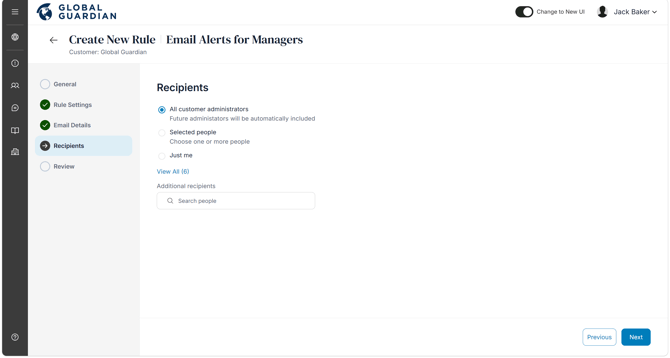
- Recipients: Select the administrators on the platform to receive the notification email.
You can also edit the list of recipients to receive these emails. Only customer administrators are able to receive admin alert email notifications.
On the platform notifications page, you will see an overview of all alert rules. Click the drop-down to see the list of alert rules you have created per type: