.png?width=300&height=65&name=GG%20Logo%20Main%20Navy%20(1).png)
The Facilities module has a variety of features which include the ability to:
- Automatically notify contacts of a location should an alert be plotted in the specified radius.
- Provide details for points of contact for that location.
- Enable an administrator to know when a user based at a location is away traveling.
- Attach internal documents or links for easy reference.
- Assign a risk level and location type.
The Facilities module is an add-on subscription to the platform. Please speak with your account manager if you would like to know more.
You're able to see all facilities on the map view, simply click on a facility to view the details and any users based there.
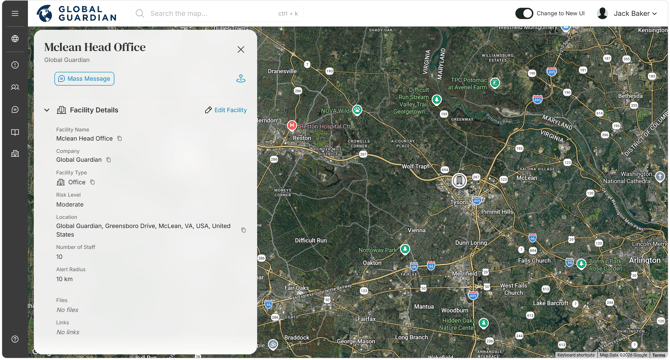
The Facilities module enables you to see an overview of all facilities on the platform. These facilities can be assigned their own risk rating, which is determined by the customer administrator based on their own risk criteria. For example, a facility may be located in a high-crime area of the city, but have a low risk rating as they have the necessary security measures in place to mitigate that risk.

Specific locations are easily accessible to edit whether from the map view or the administration view.
Messaging functionality is also available on the map view when you click on an individual facility. This allows administrators to directly message contacts for a location or all users based there. This is a helpful feature for administrators who also have access to the mass messaging tool.
Contacts for a Facility:
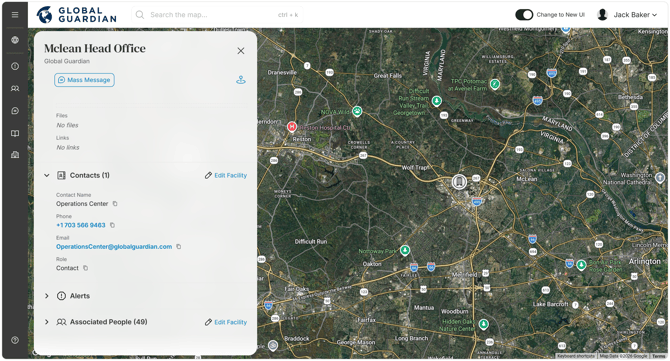
Contacts who are added to a location can be added manually or through their existing user profile details. All contacts will receive automatic email notification of all alerts plotted within the specified risk radius of that location.
It may be helpful to note when entering a contact's details manually, they do not need to have a user profile in the platform. Contacts for a location can receive alert emails that may impact a facility, but they do not have the ability to log into the platform.
Documents for a Facility:
You can store a document for a facility location, which can be attached in PDF, Word, or any standard file format. This is helpful in the event of an incident to be able to access the relevant documentation quickly. Alternatively, you can add a link to a document stored elsewhere (such as in SharePoint), which helps to ensure they remain up to date should any changes be made to the document over time.
Users Based at a Facility:
Users can be assigned to a facility location. They must have a user profile in the platform to be assigned in this way. This function helps identify who may be affected should an alert impact the facility location.