.png?width=300&height=65&name=GG%20Logo%20Main%20Navy%20(1).png)
All country reports are accessible through the web and mobile app platforms.
These reports are maintained and updated by the intelligence team.
As standard, a country report will include:
- An executive summary
- Cultural information (*new addition)
- Key facts (*recently enhanced)
- Risk summary for every intelligence category (these include political, armed conflict, terrorism, civil unrest, crime, environmental, maritime and piracy, health, and transportation)
- Emergency details
- Travel advice
- Significant dates (*new addition)
- Travel advisories
How to Access Country Reports — Web Platform
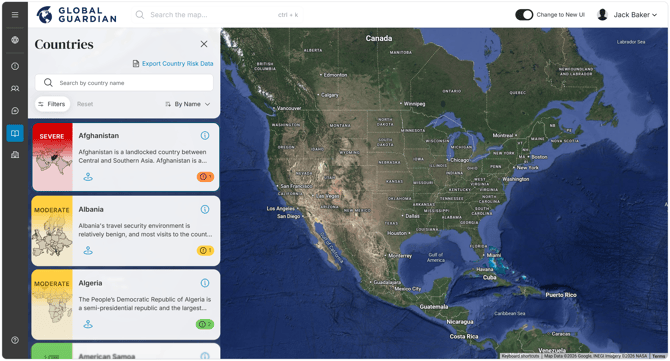
In map view, click "Country Report" in the navigation. Select a country from the drop-down, or search for a specific country, and click "Full Report." The country report will open in a new browser tab.
How to Access Country Reports — Mobile App (iOS & Android)
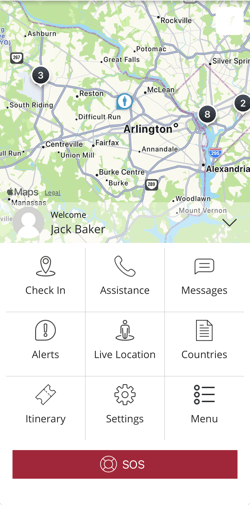
Tap "Countries" in the main grid view, select the country from the list, and the key summary information will display. Scroll down and tap "Country Report" to view the full country report in the app.
 How to Access Country Risk Levels Matrix
Users can also export a matrix table of all country risk levels and their category risk levels from the web platform. In map view, click "Country Report" in the navigation, then click "Export Country Risk Data." The matrix table will automatically download.