.png?width=300&height=65&name=GG%20Logo%20Main%20Navy%20(1).png)
Country Risk Rating Change alerts notify administrators immediately whenever the overall risk rating for a location changes. These alerts help ensure administrators stay informed and can proactively monitor the users or facilities affected by changing risk conditions.
By creating alert rules, administrators can define exactly which risk rating changes trigger notifications and who should receive them.
Create a Risk Rating Change Alert
- From the Admin Panel, open "Platform Notifications."
- Under Alerts for Risk Rating Changes, click "+ New Rule."
- Enter a Rule Name and, if required, add a Description.
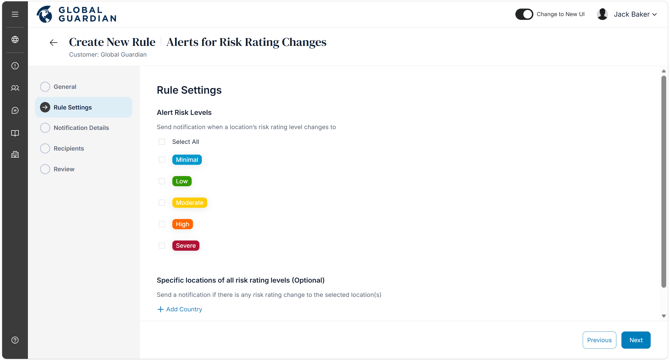
- Configure the rule settings:
- Select the risk ratings that should trigger a notification when a location changes to one of those ratings.
- (Optional) Restrict the rule to specific countries or cities. Any change in the overall risk rating for the selected locations will trigger the alert.
- Select the recipients who should receive the notifications.
- Review the rule settings and click "Save."
- Repeat these steps to create additional rules for different recipient groups or notification requirements.
Create separate rules for different teams or notification requirements. For example, security teams may need notifications for all high-risk changes, while regional managers only receive alerts for the countries or cities they oversee.