.png?width=300&height=65&name=GG%20Logo%20Main%20Navy%20(1).png)
Associating users with a facility helps organizations monitor people who work from or are assigned to a specific location. By creating notification rules, administrators can ensure those users receive timely alerts about incidents that may impact their facility.
Create a Facility-Based User Alert Email Rule
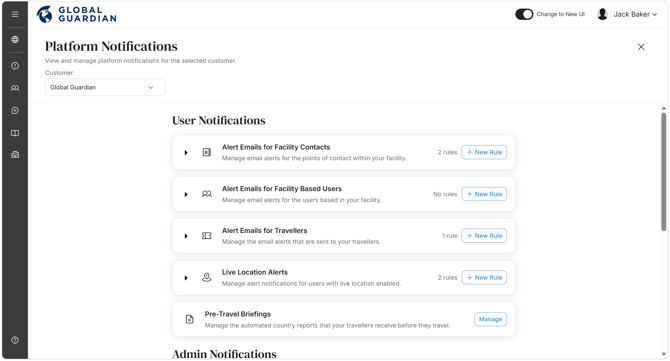
- From the Administrator Panel, open "Platform Notifications."
- Under "Alert Emails for Facility-Based Users," click "+ New Rule."
- Enter a Rule Name and, if required, add a Description.
- Click "Next."
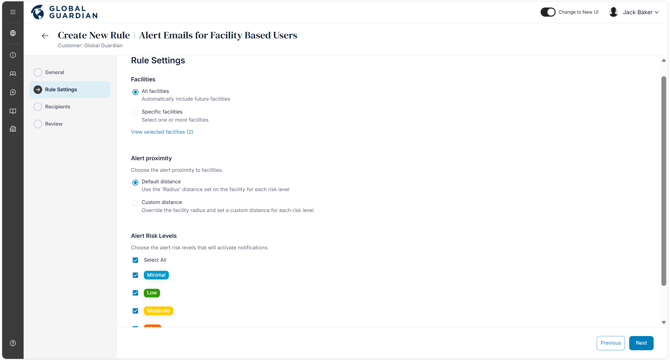
Configure the Rule Settings
Select Facilities: Choose whether the rule applies to:
- All Facilities, or
- Specific Facilities.
Configure Alert Proximity: Choose how the notification radius is determined:
- Default – Uses the risk radius configured for each individual facility.
- Custom – Overrides the facility's configured radius and applies a notification radius based on the selected alert risk level instead.
Select Risk Levels: Choose which alert risk levels should trigger email notifications, and the radius to apply if using custom alert proximity settings.
Click "Next."
Assign Notification Recipients
Choose who should receive the alert emails:
- All Facility Contacts.
- Specific people or users within the platform.
Click "Next."
Review and Save
- Review the rule settings to ensure they are correct.
- Click "Save" to create the notification rule.
Use Facility-Based User alert rules to notify people who regularly work from or are assigned to a facility, ensuring they receive timely updates when incidents occur nearby. If designated site managers or emergency contacts also need to be informed, create a separate Facility Contact alert rule so each group receives the appropriate notifications.