.png?width=300&height=65&name=GG%20Logo%20Main%20Navy%20(1).png)
- From the Admin Panel, click "Users."
- Click "+ Add User."
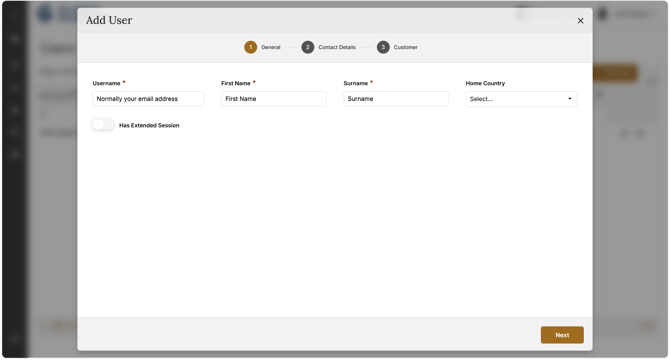
- Complete all required fields across the following screens, clicking "Next" to advance through each page. Required fields are marked with *:
- Username*: Must be the user's unique email address
- First Name*
- Surname*
- Home Country
- Primary Email*: Automatically populates when the username field is entered
- Primary Phone Number*: Must include the international dialing code
- Customer*
- Subscription*: Typically only one option in the drop-down menu
- User Group*
- Facility
- Employee ID
- Policy No.
- Tag
- Role*: Determines the user's level of accessibility or admin access
- Click "Save"
A green confirmation pop-up will appear to confirm the welcome email has been sent to the user.
Note: A phone number is not a required field when creating a user profile. However, it is always recommended for users who have access to tracking in the platform. If a user triggers an SOS, having a phone number on file ensures they can be contacted immediately.
If the user's phone number is not known, they can add it during the registration process when creating a password, or update their personal profile once logged in.
If the user reports not receiving the welcome email, ask them to check their junk or spam folder.
If they still cannot locate the welcome email, please contact the Global Guardian support team for further assistance.