.png?width=300&height=65&name=GG%20Logo%20Main%20Navy%20(1).png)
Customer Administrators can automatically email country and/or city reports to travelers in advance of their trip. This helps to ensure they are informed of the potential risks in-country before they depart and while in-country.
To access Pre-Travel Briefing settings, open the Admin Panel, select "Platform Notifications," and under User Notifications, click "Manage" next to "Pre-Travel Briefings."
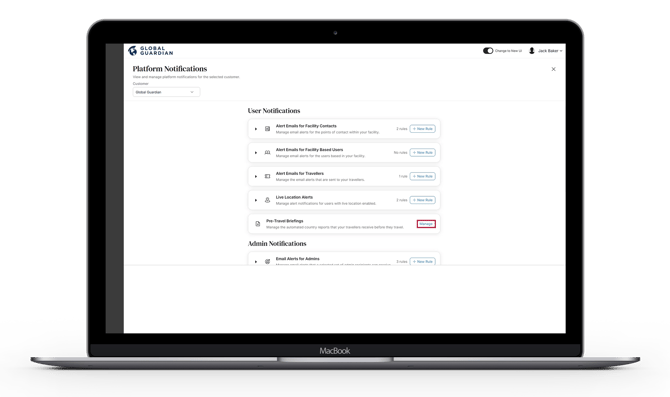
Several options will appear to set your preferences according to various options set by countries, threat levels, additional attachments and report customization.
Enter a name for the pre-travel briefing rule and optionally add a description, then click "Next."
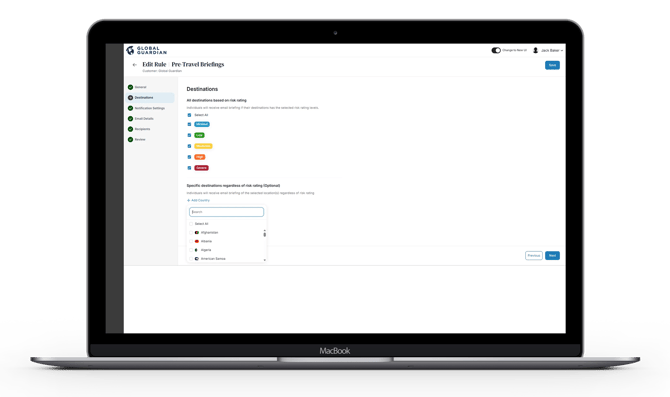
Destinations: Select which destinations should trigger a pre-travel briefing email:
- All destinations based on risk rating: Travelers will receive a briefing if their destination matches the selected risk rating levels. Choose from Minimal, Low, Moderate, High, or Severe, or select all.
- Specific destinations regardless of risk rating (Optional): Travelers will receive a briefing for the selected locations regardless of their risk rating.
Notification Settings
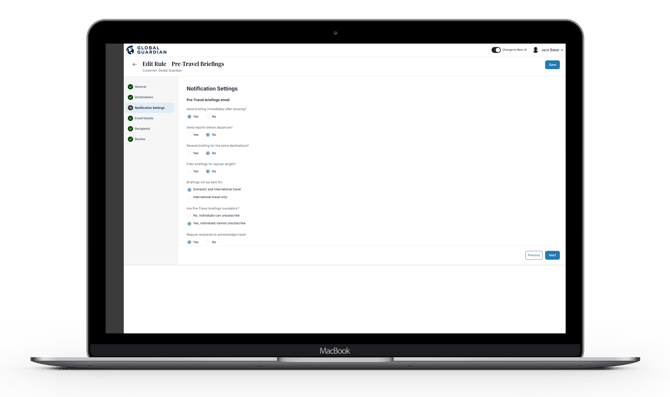
Pre-Travel Briefing Email: Configure when and how pre-travel briefing emails are sent to travelers:
- Send briefing immediately after booking: If enabled, the briefing will be sent as soon as the travel booking is processed in the platform.
- Send reports before departure: If enabled, set how many days before departure travelers will begin receiving briefings.
- Resend briefing for the same destination: If enabled, travelers will receive a briefing each time they book travel to a destination they have visited before.
- Filter briefings for layover length: If enabled, set the minimum layover duration (in hours) required to trigger a briefing.
- Briefings will be sent for: Choose whether briefings apply to international travel only, or to both domestic and international travel.
- Are pre-travel briefings mandatory: Choose whether travelers can opt out of receiving briefings, or whether receipt is mandatory.
- Require recipients to acknowledge travel: If enabled, a confirmation link will be included in the briefing email to confirm the traveler has received and read the report.
Reminder Email: If acknowledgment is required, configure automated reminders for travelers who have not yet confirmed receipt:
- Set how many days before departure the reminder email will be sent.
- Compose the automated content for the reminder email.
- All destinations based on risk rating: Travelers will receive reminder emails if their destination matches the selected risk rating levels. Choose from Minimal, Low, Moderate, High, or Severe, or select all.
- Specific destinations regardless of risk rating (Optional): Travelers will receive reminder emails for the selected locations regardless of their risk rating.
If you have enabled all Countries already, you do not need to apply Risk Level criteria. On the basis that all countries have been selected, a pre-travel briefing will be sent for every travel itinerary in the platform.
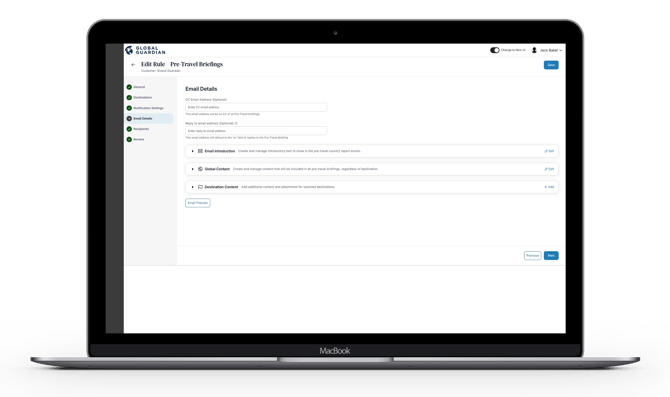
Email Details: Configure the content and settings for pre-travel briefing emails:
- CC Email Address (Optional): Enter an email address to be copied on all pre-travel briefing emails sent from the platform.
- Reply To Email Address (Optional): Enter an email address that will default as the reply-to address when travelers respond to a pre-travel briefing.
- Email Introduction: Create and manage introductory text to be included at the top of all pre-travel briefing emails.
- Global Content: Create and manage additional content that will appear in all pre-travel briefings, regardless of destination.
- Destination Content: Add destination-specific content and attachments for selected countries or cities.
- Email Preview: Preview how a pre-travel briefing email will appear to recipients before the rule goes live.
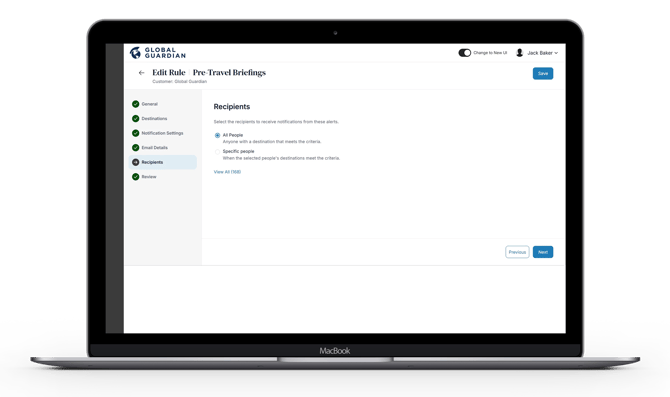
Recipients: Select who should receive pre-travel briefing emails:
- All People: Any traveler whose destination meets the configured criteria will receive a briefing.
- Specific People: Only the selected individuals will receive a briefing when their destination meets the configured criteria.
Review all configured settings before saving. If any changes are required, click "Back" to return to the relevant step. Once confirmed, click "Save" to create the pre-travel briefing rule.