
The 24/7 Operations function within the Messages panel in map view provides users with a direct, dedicated messaging channel to contact their designated Operations responder at any time, day or night.
Users can use this one-to-one conversation to discuss matters relating to their safety, security, travel, or general operational support. The feature provides a convenient way to contact the Operations teams without necessarily needing to make a phone call.
Direct Access to Operations Support
Users can communicate directly with their designated Operations responder through a dedicated one-to-one conversation.
This allows users to:
- Request assistance, guidance, or support while traveling.
- Raise concerns relating to personal safety and security.
- Discuss travel disruptions or security incidents.
- Ask operational questions and seek guidance about their travel or support arrangements.
- Continue conversations with Operations following an initial incident.
How to Access 24/7 Operations
Users can access the 24/7 Operations messaging function through either the web platform or the mobile app.
On the web:
- Log in to the web platform.
- Open the Messages panel from the left hand menu panel.
- Access the 24/7 Operations conversation box at the top of the Messages panel view
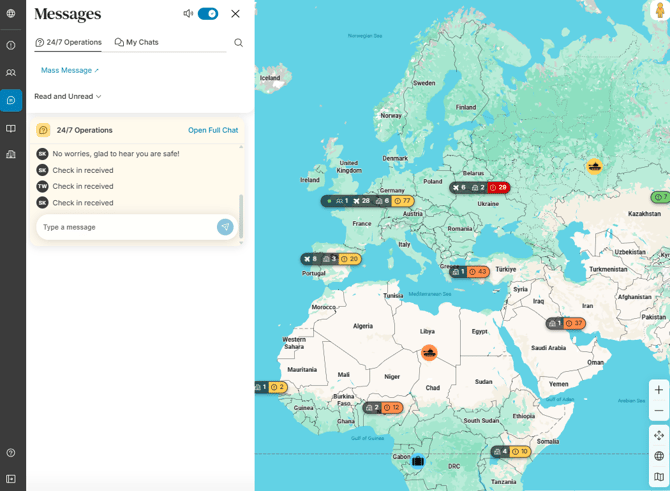
On the mobile app:
- Open the mobile app.
- Tap Messages in the main menu grid
- Tap the 24/7 Operations tab if not already shown
- Start typing in the message box
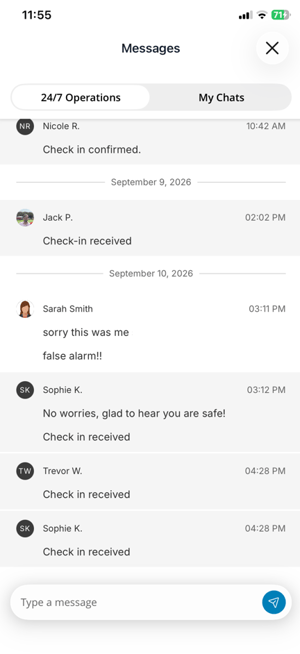
Once in the conversation, users can send a message explaining their situation, asking a question, or requesting assistance from their designated Operations responder.
When to Use 24/7 Operations
|
Use case |
Example |
|
Urgent assistance while traveling |
A traveler encounters an unexpected issue overseas and contacts the Operations team through 24/7 Operations for support. |
|
Travel disruption |
A user experiences a canceled flight, missed connection, or other travel disruption and messages Operations for guidance. |
|
Personal safety concern |
A user feels unsafe in their current location and contacts Operations to discuss the situation and receive support. |
|
Security incident |
A user encounters a security incident or changing local conditions and needs to contact Operations. |
|
Emergency support |
A user needs urgent assistance and wishes to contact Operations directly through messaging rather than making a phone call. |
|
Follow-up support |
A user continues a conversation with Operations after an initial incident, keeping relevant context within the messaging channel. |
|
Quick operational query |
A user has a question about their travel or support arrangements and contacts Operations directly through the app. |