.png?width=300&height=65&name=GG%20Logo%20Main%20Navy%20(1).png)
Associating users with a facility helps organizations monitor people who work from or are assigned to a specific location. By creating notification rules, administrators can ensure those users receive timely alerts about incidents that may impact their facility.
Create a Facility-Based User Alert Email Rule
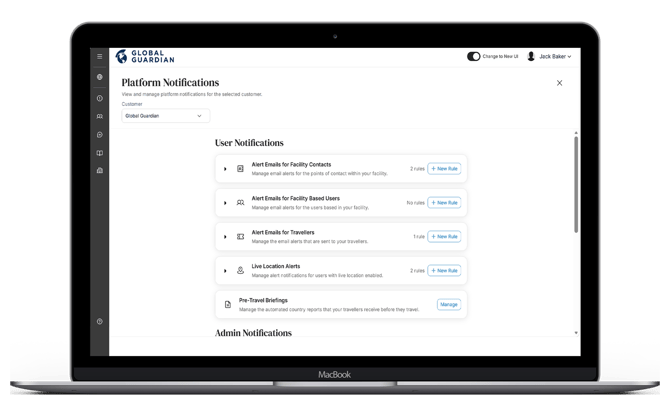
- From the Administrator Panel, open "Platform Notifications."
- Under "Alert Emails for Facility-Based Users," click "+ New Rule."
- Enter a Rule Name and, if required, add a Description.
- Click "Next."
Configure the Rule Settings
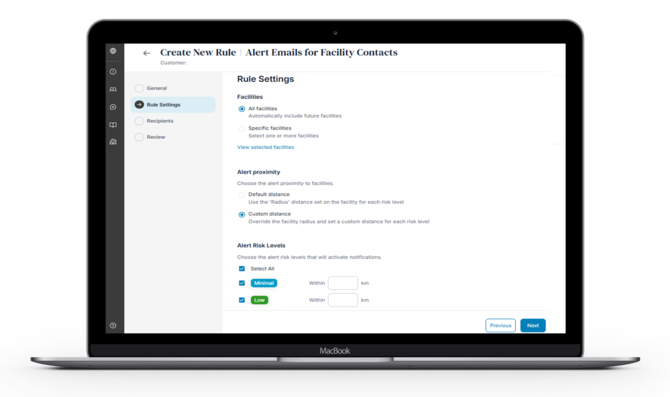
Select Facilities: Choose whether the rule applies to:
- All Facilities, or
- Specific Facilities.
Configure Alert Proximity: Choose how the notification radius is determined:
- Default – Uses the risk radius configured for each individual facility.
- Custom – Overrides the facility's configured radius and applies a notification radius based on the selected alert risk level instead.
Select Risk Levels: Choose which alert risk levels should trigger email notifications, and the radius to apply if using custom alert proximity settings.
Select Alert Categories: Choose the alert categories that will activate notifications.
Select Keywords: Use keywords or phrases from the alert title or content to control when notifications are sent.
Click "Next."
Assign Notification Recipients
Choose who should receive the alert emails:
- All Facility Contacts.
- Specific people or users within the platform.
Click "Next."
Review and Save
- Review the rule settings to ensure they are correct.
- Click "Save" to create the notification rule.
Use Facility-Based User alert rules to notify people who regularly work from or are assigned to a facility, ensuring they receive timely updates when incidents occur nearby. If designated site managers or emergency contacts also need to be informed, create a separate Facility Contact alert rule so each group receives the appropriate notifications.