
When a new alert is created in the platform, administrators can receive an email containing details of the alert, including a table showing how many assets are affected by the alert and a link to view full details.
You must have customer administrator permissions to configure live location alerts.
- Navigate to the Administration Panel and click "Platform Notifications."
- Find "Email Alerts for Admins" and click "+ New Rule."
- Enter a Rule Name and, if required, add a Description and a Start and End date and time if this rule requires a time limitation.
- Click "Next."
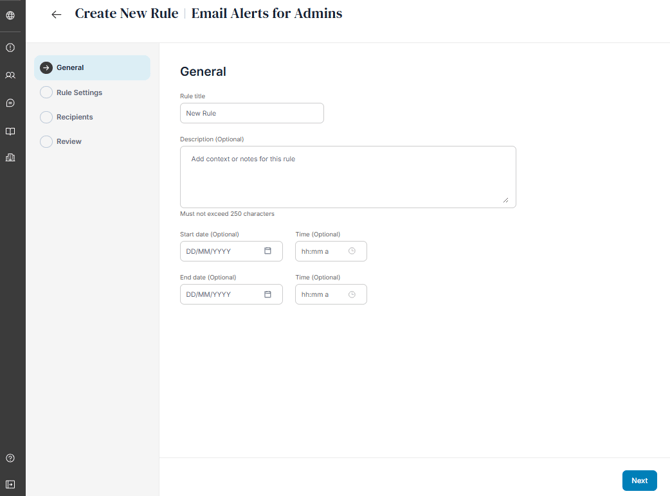
Select the preferred alert types or a combination of options available for this rule:
- Alerts in selected locations
- Alerts in selected locations that affect people
- Alerts in selected locations that affect facilities
- Alerts within geofences
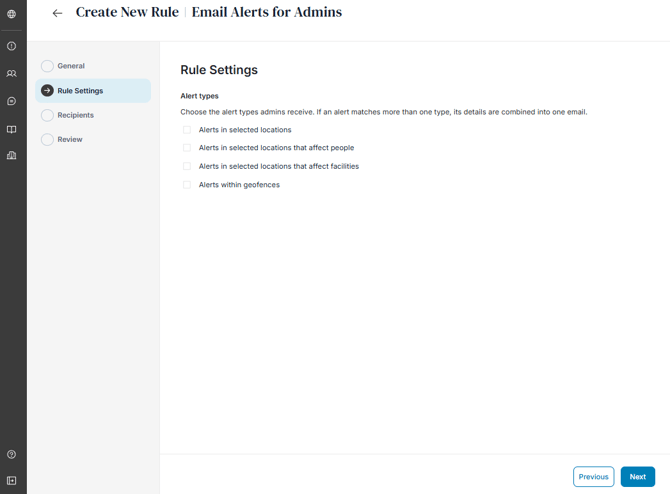
According to the alert types selected, it will thereafter display the additional rule setting options you can select. These include:
- Alert Risk Levels: Select risk level for which administrators will be informed of if a user, asset or geofence is impacted by an alert. You can also apply custom radius' per risk level according to whether people or facilities are affected dependent on the alert types you have selected for this rule.
- Locations:
- Select specific countries which apply to the selected risk levels by entering them into the search box or bulk select by region.
- There is also an option to override alert risk level settings by enabling the toggle "Select additional locations regardless of alert risk level". This ensures that even if the alert risk criteria are not met, the user will still receive email alert notifications based on their travel itinerary. This setting is helpful when traveling to countries that are moderate-risk overall but may have regions which are higher risk or prone to spontaneous events that could increase the risk to those nearby.
- Alert Categories: Select a categories or which administrators would be informed of if a user, asset or geofence is impacted by an alert.
- Keywords: Enter key words or phrases that may be contained in an alert to be informed or excluded to an administrator if is it within the alert.
- Affected People: Select a specific user in the platform to be notified of when an alert may affect them, or alternatively apply an exception
- Affected Facilities: Select whether the rule applies to all facilities or specific facilities, or alternatively apply an exception.
- Geofences: Select whether the rule applies to all geofences or specific geofences, or alternatively apply an exception.
Click "Next."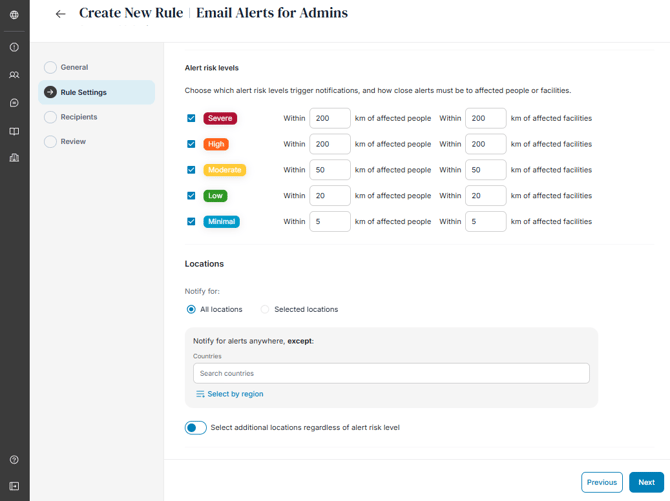
Edit the list of recipients to receive these emails. Only customer administrators are able to receive admin alert email notifications.
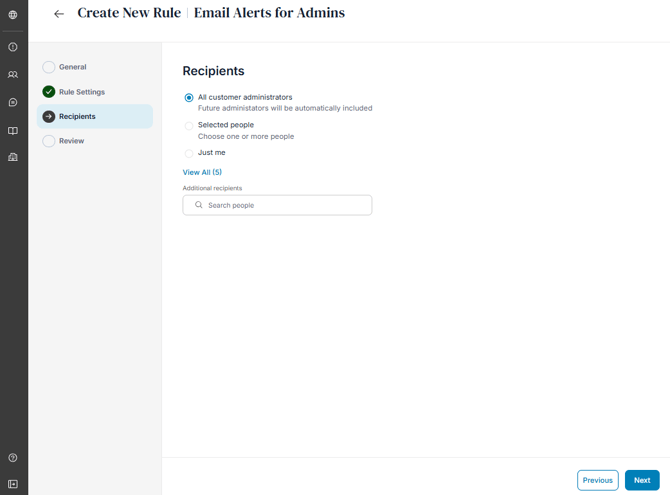
Click "Next," review and save your admin email alert rule.